|
The Tools Palette
|   |
|
The Tools Palette
| |
All graphics tools are selected in the Tools palette:
You can also select drawing and erasing colors using the swatches at the top of the Tools Palette.
The Swatch Box
Below the Tools palette is a sample of the current tool, called the swatch box:
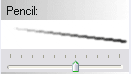
The swatch is drawn with tool weight increasing from left to right. Weight is defined differently for each individual tool type; see the sections above to see how it applies to each of the natural-media and vector tools.
Below the swatch box is the Tool Weight Slider, which shows the current weight for the selected tool. You can change the tool weight either by dragging the slider knob left and right, or by clicking in the swatch, or with the [ and ] keys.
The Tool Weight Slider becomes the Layer Opacity Slider when the Move Layer tool is selected.


